
OM-to-DCF software converts an offering memorandum and supporting property documents into inputs for a discounted cash-flow model. Moraine does this for office, retail and industrial acquisitions, with editable assumptions, scenarios, source references and XLSX outputs. An OM can start the model; leases, a current rent roll and operating statements may still be needed to resolve important inputs.
What does an OM-to-DCF workflow actually deliver?
A useful workflow has three distinct outputs: extracted source facts, explicit underwriting assumptions and a calculated model. A narrative summary or a table of extracted values is not a completed property DCF. A polished workbook is not evidence that its inputs were approved.
Also distinguish reading an offering memorandum from creating one. Seller-side OM-writing software prepares marketing material. Acquisition underwriting tests that material against leases, rent rolls, operating history and the buyer’s assumptions.
Where the DCF inputs should come from
| Model input | Evidence to start with | Review before accepting |
|---|---|---|
| Property identity and area | OM, rent roll and other property records | Same property, units and measurement basis across files |
| Opening rent | Current rent roll and lease documents | Monthly versus annual, contractual versus asking rent, concessions and as-of date |
| Lease rollover | Leases, amendments and rent roll | Expiration, options, rent steps and conflicts between versions |
| Operating expenses | T-12 and historical statements | Complete reporting period, account mapping and recurring versus one-time items |
| Recoveries | Lease reimbursement provisions and relevant schedules | Pools, exclusions, caps, expense stops and gross-up treatment |
| Future market rents and tenant costs | Your approved underwriting assumptions and supporting evidence | Distinguish a market assumption from a contractual source fact |
| Debt and exit | Loan proposal or documents, plus your approved sale assumptions | Financing terms, exit NOI period, sale costs and timing |
An OM may mix actual operating figures with a broker forecast. Preserve those labels. Missing debt, recovery or lease information should remain visible rather than quietly becoming zero or an assumed standard term.
How the model should be built and reviewed
- Identify each document’s property, version, as-of date and reporting period.
- Extract the tenant and financial inputs with the source location and units intact.
- Reconcile the extracted rows and totals to the documents. Separate missing inputs from conflicts and from deliberately supplied assumptions.
- Approve the assumptions that drive cash flows: rollover, downtime, recoveries, capital, debt and exit.
- Review the resulting cash flows and returns, change a material input, and check that dependent schedules update.
- Inspect the exported workbook and the source/review evidence that accompanies it.
The order matters. Validating a plausible-looking IRR cannot establish that rent steps, expense recoveries or leasing costs were modeled correctly.
How is a property DCF different from a cap-rate calculation?
A cap-rate calculation is a single-period income-and-value relationship. A DCF considers cash flows across the holding period and a sale assumption. It can therefore represent changes in occupancy, rents, lease rollover and capital spending that a single NOI snapshot leaves out.
For an acquisition model, confirm whether the reported return is levered or unlevered, what dates and cash flows it uses, and how the exit proceeds are calculated. A discount rate, a capitalization rate and an IRR are different measures; labeling them clearly is part of a usable export.
For background, V7’s real estate DCF guide explains the relationship between documents and DCF inputs. That educational material is separate from evidence that any product accurately models your deal.
Compare software by the output your team needs
| Approach | What to ask the vendor to demonstrate | What your team still owns |
|---|---|---|
| Moraine | Editable commercial property DCF, source review, scenarios and XLSX export | Source approval, investment assumptions and final underwriting review |
| House-workbook population | Correct inputs entering the intended cells of your existing workbook | Template standard, formula review and mapping acceptance |
| Standalone extraction | Source-linked tenant and statement tables | Building and validating the financial model |
| General AI assistant | Clearly labeled summaries or draft tables from supplied documents | Source verification, financial calculations and confidentiality requirements |
| Manual Excel or ARGUS workflow | The required property calculations and accepted reports | Input entry, reconciliation and model review |
AcquiOS and PropRise Primer describe existing-workbook workflows; Apers describes Excel modeling. These are vendor statements, not comparative accuracy measurements. Run the same source package through the options you shortlist.
A worked review example: three documents, three rent figures
Consider an illustrative property, not a customer result. The current rent roll implies $600,000 of annualized base rent; the trailing statement reports $540,000 of rental income; the broker forecast shows $660,000. Those amounts should not be forced to agree.
The rent roll is a point-in-time run rate; the T-12 records a past period; the forecast describes a proposed future. Reconcile the $60,000 roll-to-T-12 gap using document dates, commencement timing, vacancy, free rent, collections and accounting treatment. Review the separate forecast assumption. Keep the source figure and the approved modeling decision distinguishable.
Download a matched calculation and Excel example
The ARGUS-alternatives guide includes a fictional source packet and two workbooks generated by Moraine’s production calculation and export functions. The inputs were mapped manually; the example is a calculation-and-export demonstration, not a document-extraction benchmark.
Read the source packet, open the base workbook, and compare the rent-downside workbook. In Cash Flow Projections, B9 shows Year 1 scheduled rent and B21 shows NOI. Reducing the rent assumption by 10% changes annual rent from $300,000 to $270,000 and NOI from $200,000 to $170,000, with operating expenses held at $100,000.
The source packet keeps the base lease fact separate from the hypothetical buyer stress. The evidence file records the inputs, checked cells and file hashes. Each workbook contains calculated report values; change assumptions in Moraine and export a new case to test the model response.
Inside Moraine: review the assumptions, then the cash flows
These screenshots show Moraine’s built-in retail sample. They illustrate the modeling interface; they are not a benchmark of document extraction or a customer investment result.
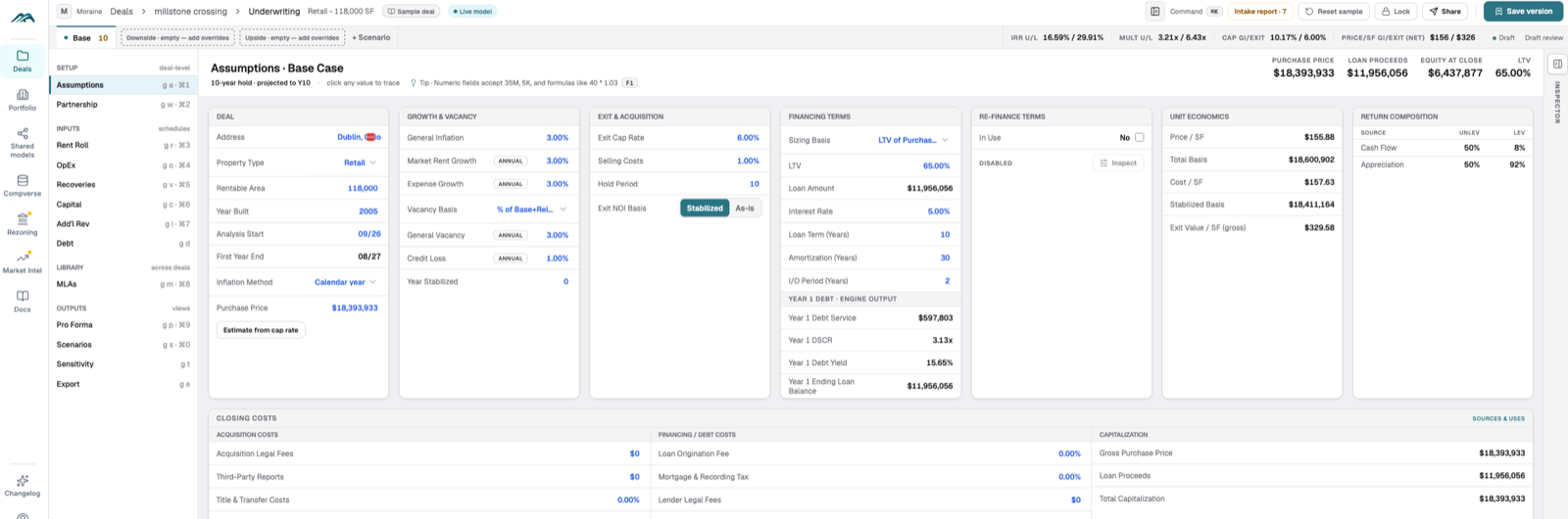
The Assumptions view puts growth, vacancy, exit and financing inputs together. Review where each assumption came from before accepting the returns. A forecast from the broker and a decision made by the buyer should remain distinguishable.
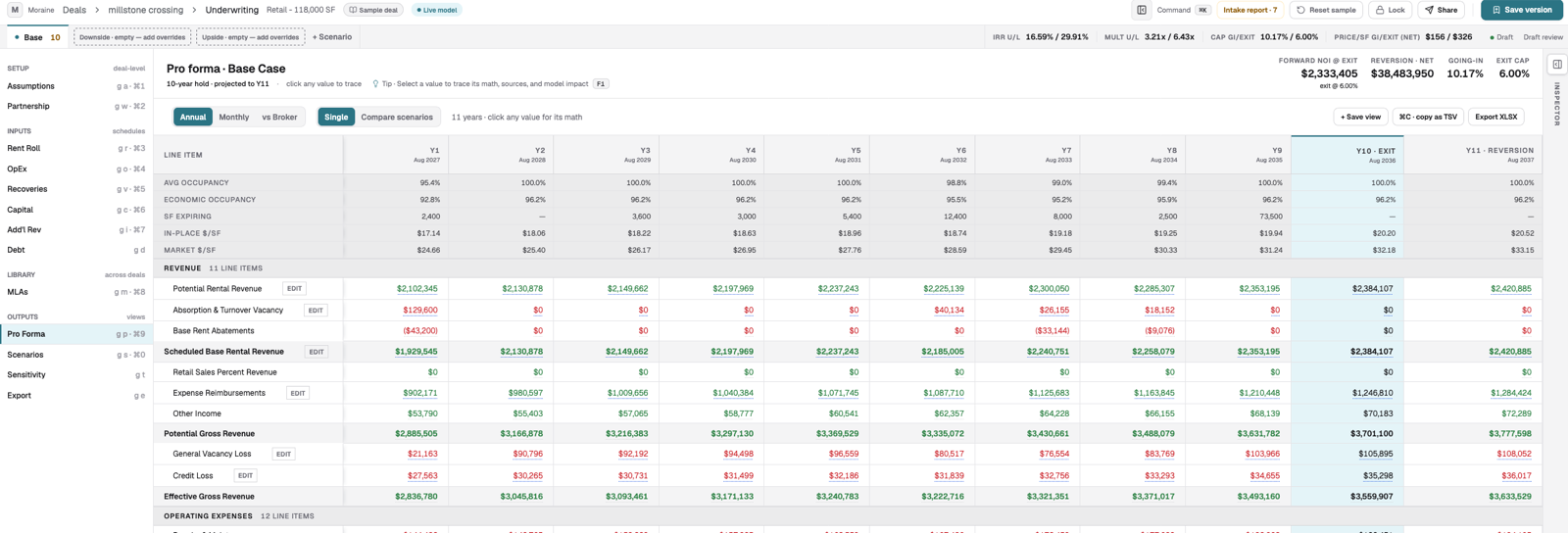
The Pro Forma view shows annual cash flows and an XLSX export control. Inspect rent, vacancy, abatements and reimbursements before relying on the headline return. For your own deal, follow a disputed input back to the underlying documents and review the exported workbook.
Start a Moraine evaluation with a source packet you are entitled to use. Test the review process on one property before adopting it across the pipeline.
Pricing, scope and the last check before IC
Moraine Individual is $300/month; Team starts at $1,500/month for five users. There is a free 14-day evaluation from the first usable model, with no card required. Full diligence is separately $3,000/property. See pricing for complete terms.
Moraine supports office, retail and industrial today. Outputs are XLSX, not a finished PDF memo or a native ARGUS file. A qualified underwriter should review missing inputs, source conflicts, recoveries and returns before committee. See product limits, security and ARGUS alternatives.